Near-instant large image uploads
PixelPeeper is a web-based image metadata viewer. Photographers use it to reverse-engineer camera settings and Adobe Lightroom edits from JPEG files.
Image upload is a core feature and I wanted to make it feel really fast. Images are uploaded to an S3 bucket and processed by the Rails backend. The problem is that some JPEG files can be quite large (up to 60MB) and uploading them takes time.
One way to solve it is to downsize the image in the browser before uploading it: use the Canvas API to draw the thumbnail, and then call canvas.toBlob() to get a new, smaller JPEG file.
This is a common technique, but it has a big downside: it strips metadata from the image. And metadata is the whole point of PixelPeeper.
The trick is to extract the metadata from the original image and reattach it to the resized blob before uploading:
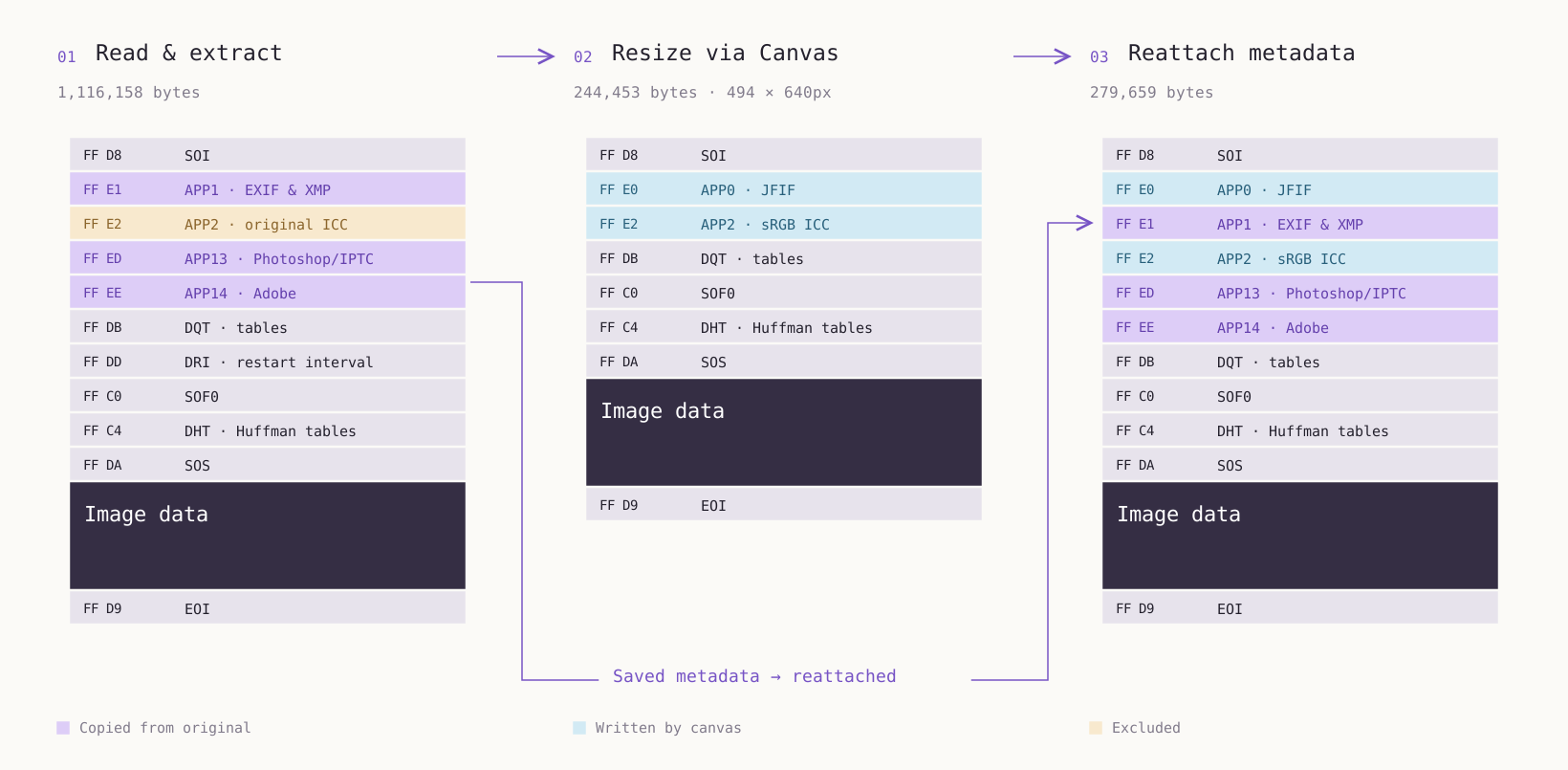
JPEG stores metadata usually near the beginning of the file in APPn segments, so we can copy those segments from the original file into the resized JPEG without changing the image data. This is, BTW, one way various image size optimization tools work: they strip out unnecessary metadata to reduce file size without affecting the image quality.
How it works
Here’s what happens when you upload an image to PixelPeeper:
- You drop or select an image file.
- Client-side JavaScript reads the original file and extracts the metadata.
- Image is resized to a small thumbnail via Canvas API and displayed in the browser immediately.
- Metadata is reattached to the thumbnail and uploaded to file storage.
- The backend downloads the thumbnail and processes it.
- When done, the backend sends a status update via WebSocket to the browser.
The Canvas API tends to mess up image orientation, so there’s another step in the process: we extract the EXIF orientation tag from the original image and rotate the canvas to match it. It also creates its own ICC profile, which is different from the original image’s ICC profile. PixelPeeper doesn’t use the ICC profile for anything, so we don’t reattach it to the resized image.
Obviously, we lose the original image and only keep a low-resolution thumbnail. For PixelPeeper, this is a reasonable tradeoff, because we need just enough data to analyze the image (extract metadata and color palette, calculate a perceptual hash, etc.) without the overhead of handling the full-size image.